Apex Legends Guide
Heres a quick summery on how to use, setup and cheat in apex legends using Hydra Software.
Requirements & Information
Before getting started, make sure your system meets the following requirements:
- Official Windows 10/11 Home/Pro (1909–25H2)
- BIOS Virtualization (VT-x / SVM / AMD-V) enabled
- Integrated GPU (APU/iGPU) disabled
- Minimum 16GB RAM
- All antivirus/security software disabled
- PIN/Password disabled
Guide for Hydra Apex/R6/Spoofer:
Read everything and use common sense before proceeding.
- Do not change game settings from default values.
- If you are using the loader for the first time, your PC may restart several times.
- You may be prompted to disable Secure Boot during setup.
- Once setup is completed, Secure Boot can be re-enabled if desired.
- After any restart, reopen the loader and continue the process.
Launch Steps for Hydra External
Before launching:
Disable all security-related software and protections:
- Windows Defender
- Antivirus software
- Windows PIN/Password (required if using the spoofer)
- Any other active system protections
Spoof only after launching EGS or Ubisoft Connect.
Step 1 — Setup Overlay Software
Choose either Discord Overlay or Medal Overlay.
Run the selected application as Administrator.
(Overlay setup is not required if only using the spoofer.)
Step 2 — Run the Loader
Download the loader from Here
- Run the loader
- Keep focus on the monitor where you want the overlay to appear
Medal Overlay Installation
Download
Installation Steps
- Download and install Medal
- Run Medal as Administrator
- Continue with injection
- For improved FPS:
- Open Clip Settings
- Disable Capture Clips
Important Note
No matter what settings you prefer, the game should always run in:
- Borderless
- Windowed
These are the only officially supported display modes.
Discord Overlay Installation
Download
Installation Steps
- Download and install Discord
- Run Discord as Administrator
- Enable required functions using the setup images below:
Required setup image: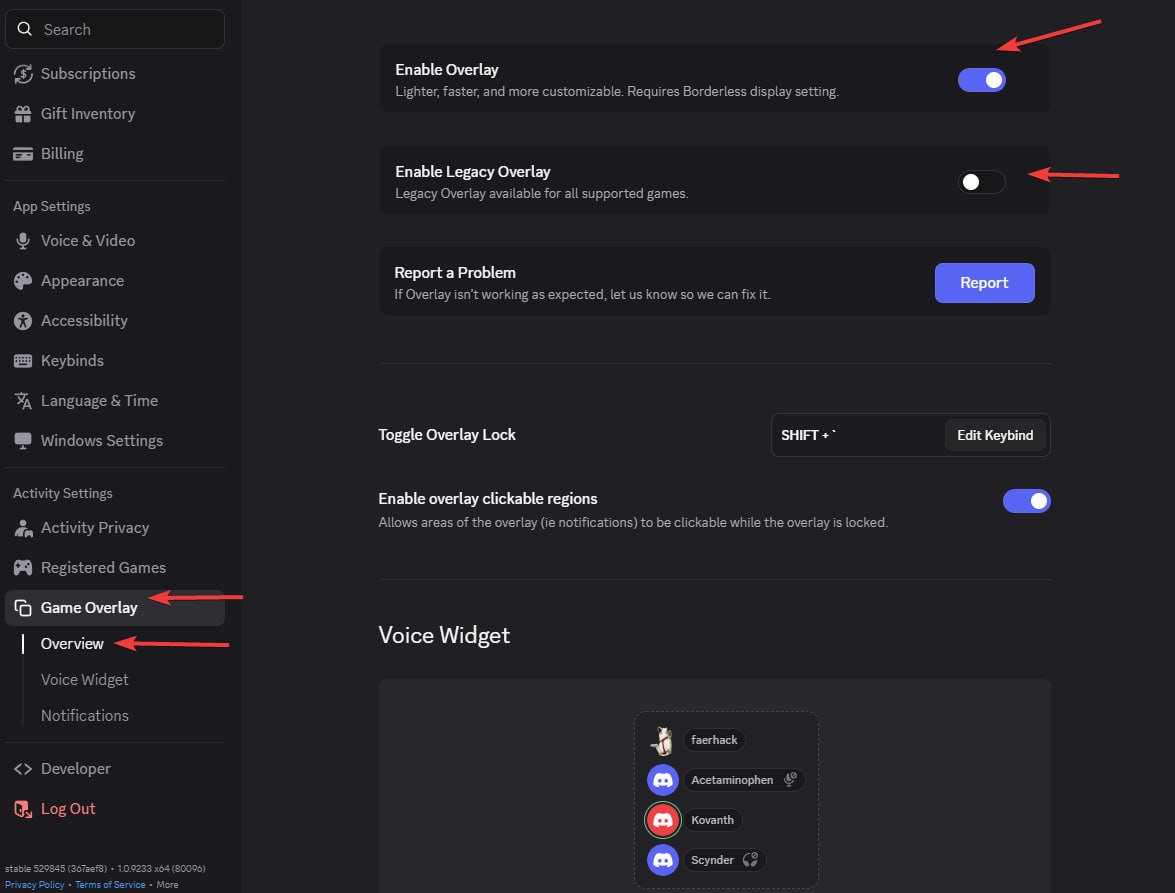
If Discord displays "No suitable overlay", follow these additional setup images:


Important Note
The game should always run in:
- Borderless
- Windowed
These are the only officially supported display modes.
Published at Jun 12, 2026
Rainbow Six Guide
Heres a quick summery on how to use, setup and cheat in Rainbow Six Siege using Hydra Software.
Call Of Duty Guide
Heres a quick summery on how to use, setup and cheat in Call Of Duty using Hydra Software.
Rust Guide
Heres a quick summery on how to use, setup and cheat in Rust using Hydra Software.
Marvel Rivals Guide
Heres a quick summery on how to use, setup and cheat in Marvel Rivals using Hydra Software.
Arc Raiders Guide
Heres a quick summery on how to use, setup and cheat in Arc Raiders using Hydra Software.
Fortnite Guide
Heres a quick summery on how to use, setup and cheat in Fortnite using Hydra Software.